 Skip to content
November 28, 2025
Fix It Yourself: Essential IT Troubleshooting Tips for Your Business

IT Troubleshooting for Businesses: 5 Essential Fixes
Why Every Business Needs Basic IT Troubleshooting Skills
IT troubleshooting for businesses is essential for maintaining efficiency and preventing costly downtime. When tech fails, every minute counts, and having the right skills can mean the difference between a quick fix and hours of lost productivity.
Common IT issues businesses face daily:
- Network connectivity problems – dropped connections, slow internet, Wi-Fi dead zones
- Software crashes and freezes – applications not responding, system errors
- Hardware malfunctions – printer offline, device not recognized, overheating
- Security threats – viruses, malware, phishing attempts
- User access issues – forgotten passwords, account lockouts
- Performance slowdowns – sluggish computers, server overload
Research shows that 80% of IT problems stem from ‘moving parts’ like software updates or user actions, not hardware failures. This means many issues are quickly resolvable. Furthermore, businesses with proactive IT management see 40% less downtime, and proactive monitoring can reduce it by up to 70%.
When your website crashes or your team can’t access critical files, waiting for external IT support isn’t always an option. Basic troubleshooting skills empower your team to solve common problems fast, keeping your business running smoothly.
My experience helping businesses optimize their digital infrastructure has shown that the most successful companies combine internal problem-solving with professional support when needed.
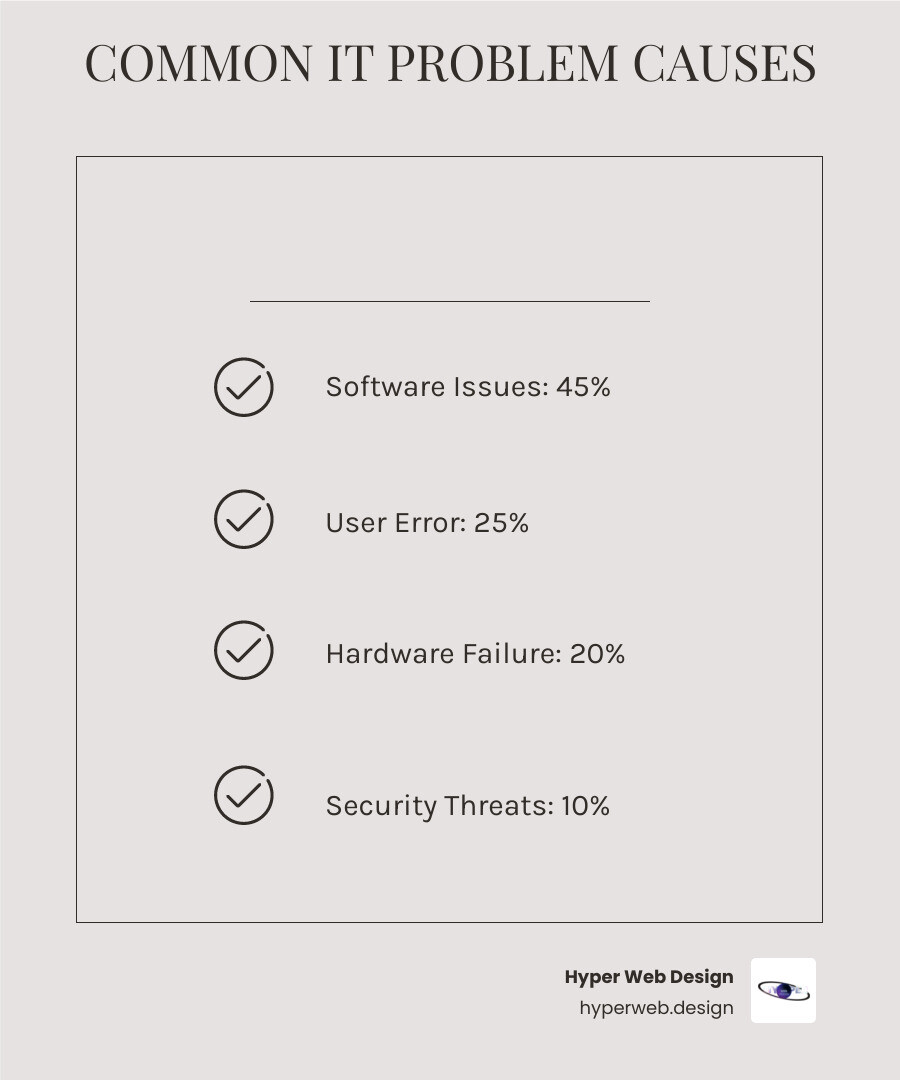
Basic it troubleshooting for businesses terms:
A Step-by-Step Guide to IT Troubleshooting for Businesses
When your computer throws a tantrum on a Monday morning, don’t panic. Most IT issues can be solved with a calm, methodical approach.

Think of IT troubleshooting for businesses like being a detective. You gather clues, form theories, test them out, and document your findings. The key is staying organized and not jumping to conclusions too quickly.
The Foundational Troubleshooting Framework
A structured troubleshooting framework can reduce resolution time and keep everyone from running in circles.
- Identify the Problem: Ask specific questions to understand what’s really happening. Users might say “the computer is broken” when they mean “I can’t print.” Get details and screenshots.
- Form a Hypothesis: Based on the clues, guess the cause. Start with the simplest explanation, like a loose cable for a network issue.
- Test Your Hypothesis: Systematically rule things out, starting with the basics. Is everything plugged in?
- Plan and Implement: Before making changes, consider the potential impact. If your tests confirm the hypothesis, apply the fix. If the risk is high, it’s time to call an expert.
- Verify and Document: After the fix, test thoroughly to ensure the problem is gone and no new issues have appeared. Document the problem, steps taken, and the solution for future reference.
Tackling Common IT Problems: A DIY Checklist
Many everyday IT headaches can be solved before you call for help. Here’s your go-to guide for the most common IT troubleshooting for businesses scenarios:

Slow Computer: Start with a reboot. If that fails, use Task Manager to close resource-heavy programs, run Disk Cleanup, update software, and scan for malware. Check for a full hard drive.
Network Issues: Unplug your router for 15 seconds, then plug it back in. Check for snug cables and, if on Wi-Fi, move closer to the router or try a different channel.
Software Crashes: Restart the application. Check for updates, clear the cache, and ensure your computer meets the software’s requirements. As a last resort, reinstall it.
Printer Problems: Check the basics: Is it on, with paper and ink? Clear the print queue, install the latest drivers, and confirm it’s the default printer.
Login Issues: Use the “forgot password” link, but first check if Caps Lock is on. A password manager can prevent this issue in the future.
Data Loss: Don’t panic. Check your backups first. Look in the Recycle Bin or Trash. Run a disk check for storage errors.
Proactive Maintenance to Prevent Future Headaches
The best IT problems are the ones that never happen. Proactive monitoring can reduce system downtime by up to 70%.
Regular System Checks: Monitor CPU, memory, and disk usage. Set up alerts to catch problems before they become disasters.
Software Updates: Keep software current for security and performance. Schedule updates during off-hours to minimize disruption.
Antivirus Protection: Ensure your security software runs automatically and is working correctly. Malware doesn’t take breaks.
Storage Management: Full hard drives slow everything down. Clean up temporary files and use cloud storage for less-used files.
Data Backups: Automate backups and test them periodically. A backup you can’t restore is useless. Have a disaster recovery plan.
Network Health: Regularly check Wi-Fi coverage, review device connections, and ensure network settings are correct.
Employee Training: Education is your first line of defense. Teach your team about phishing, strong passwords, and safe browsing.
For more comprehensive guidance on keeping your IT environment healthy, check out our detailed resources on IT Maintenance for Businesses. Taking these proactive steps will save you countless hours of reactive troubleshooting down the road.
Beyond DIY: When to Call in the Experts
While basic it troubleshooting for businesses skills are valuable, some problems are too complex or critical for a non-IT team to handle. That’s when professional IT support becomes a necessity.

Choosing the Right IT Support for Your Business
Deciding between in-house staff or an outsourced managed IT service provider (MSP) depends on your business size, budget, and needs. Expecting non-IT staff to handle complex network issues is often inefficient. Knowing when to call professionals is the most cost-effective solution.
Here’s how different IT support options stack up:
| Feature | In-House (Non-IT Staff) | Dedicated In-House IT | Managed IT Service Provider (MSP) |
|---|---|---|---|
| Cost | Low (initially) | High (salaries, benefits, training) | Moderate (predictable monthly fee) |
| Expertise | Limited, reactive | Specialized, but can be narrow | Broad, multi-disciplinary, up-to-date |
| Availability | During business hours | During business hours, on-call for emergencies | 24/7/365, remote support |
| Proactive Management | Minimal | Variable, depends on staffing | Extensive, continuous monitoring |
| Scalability | Low | Moderate (hiring, training) | High (flexibility to scale services) |
| Focus | Core business tasks | IT infrastructure | IT infrastructure & strategic alignment |
The numbers are compelling: outsourcing can save up to 40% on IT costs and increase operational efficiency by 30%. An MSP offers access to a team of experts without the overhead of full-time staff. They can even work with your existing team in a co-managed model. For comprehensive support, consider partnering with a dedicated Business IT Support Company.
The Advantages of Professional IT Troubleshooting for Businesses
Professional IT service providers bring advantages that go far beyond a DIY approach.
24/7 Proactive Monitoring: Instead of waiting for a crash, MSPs use monitoring tools to watch your IT infrastructure’s health, performance, and security. They can spot and fix potential issues before they impact your operations.
Faster Issue Resolution: Professionals use their expertise and tools to diagnose problems quickly. Remote IT support can resolve issues up to 50% faster than in-person visits.
Specialized Expertise: MSPs offer a deep bench of IT professionals, from network engineers to cybersecurity specialists. This is crucial for complex problems like server malfunctions or advanced cyber threats. The demand for these skills, like information security analysts, is rapidly growing.
Advanced Tools: Professionals use enterprise-grade diagnostic, security, and management tools that are too costly for most businesses to acquire, providing insights unavailable through basic troubleshooting.
Focus on Core Business: Offloading IT responsibilities lets your employees concentrate on growing the business, eliminating the stress of unexpected IT disruptions.
Building a Resilient and Secure IT Infrastructure
Beyond day-to-day troubleshooting, professional IT services build a robust and secure IT infrastructure that future-proofs your business.
Comprehensive Cybersecurity: Professionals implement multi-layered defenses, conduct vulnerability assessments, and manage endpoint, network, and cloud security to protect against costly incidents.
Data Protection and Compliance: They ensure your data is backed up, secure, and compliant with regulations like HIPAA or GDPR through automated scheduling and disaster recovery planning.
Strategic IT Planning: A technology partner aligns your systems with business goals, assisting with budgeting, device lifecycle management, and ensuring your infrastructure can scale.
Business Continuity: A well-planned strategy ensures your operations can quickly resume after a disaster, cyberattack, or system failure through rapid data restoration.
At Hyper Web Design, we know a strong digital presence relies on secure, efficient IT operations. Our commitment to Secure Web Solutions extends to advocating for robust IT practices that protect your digital assets. Professional IT support ensures your technology drives success, not obstacles. By combining your team’s basic skills with expert guidance, your business can navigate the digital landscape with confidence. Ready to strengthen your IT foundation? Explore our secure web design services and see how a robust digital strategy can transform your business.